

Platform Comparisons
Turn Phone Photos into Product Listings: An AI Workflow

Turn smartphone photos into a useful product catalog by separating image cleanup, verified product facts, AI-assisted writing and merchant approval. For Nigerian sellers considering Baci, its documented catalog tools provide a starting point, but a complete photo-to-listing automation workflow still needs account-level verification. Start with a small batch before committing hundreds of images.
Decision summary
A camera roll contains pictures; a sellable catalog needs identifiable products, correct variants, prices, stock and purchase information. The practical decision is which parts of that preparation you can safely delegate to AI, and which require your records or physical inspection.
Baci’s reviewed implementation evidence covers AI-assisted storefront and content workflows, CSV imports, variants and inventory management. It does not establish a deployed workflow that automatically removes product backgrounds, extracts specifications from photos and publishes complete listings for every merchant. That remains a verification question, rather than proof that the functionality is absent.
This guide combines official-source verification with an editorial workflow recommendation. It is not a hands-on product test. The proposed steps below describe how to prepare and approve catalog material; they are not instructions for an independently verified Baci photo-import interface.
For a boutique seller, begin with one garment that has several sizes. For an electronics merchant, choose an item whose exact model and configuration you can verify. If that sample cannot survive the review process, scaling the same approach across a camera roll will multiply the corrections.
Feature comparison: what the evidence establishes
Shopify provides a useful category benchmark because its help documentation describes separate image-editing and description-generation workflows. Those documented capabilities do not establish Baci feature parity. Official pages were checked on 4 November 2026.
| Decision criterion | Baci evidence | Shopify benchmark | Merchant implication |
|---|---|---|---|
| Background cleanup | A deployed photo-background workflow is not established by the supplied register and public pages. | The media editor documents AI background removal and replacement on desktop and mobile. | Ask for a demonstration using your own difficult product photo. |
| Product description drafting | AI-assisted content workflows are implementation-evidenced; exact product-photo inputs and enabled tools need confirmation. | Description generation uses supplied details, including titles and keywords. The help page says generation requires desktop access. | Phone photography does not guarantee an entirely phone-based writing workflow. |
| Specifications from images | Reliable automatic extraction into product fields is not established. | The reviewed description guidance does not establish photo-only specification extraction. | Use labels, supplier records and physical checks as the authority. |
| Catalog organization | CSV import, variants and stock workflows are implementation-evidenced; bulk import is plan-gated. | This guide does not evaluate Shopify import or inventory workflows. | Confirm the accepted file format and your account entitlement before preparing a large import. |
| Setup and support | Public pricing lists Standard Support on Free and Priority Support on Pro. | The reviewed Basic pricing table lists live chat support. | Support labels alone do not establish response times or migration assistance. |
| Local checkout and delivery | Payment and shipping workflows depend on eligibility, configuration and provider coverage. | Nigerian gateway and delivery eligibility were not evaluated here. | Run a separate checkout and fulfillment check before choosing a platform. |
Use the current Baci feature overview to frame your questions. Request confirmation of the exact app platform, subscription and workflow your business would use. A feature description or implementation record cannot substitute for completing the task in your account.
A practical workflow from camera roll to catalog
1. Group photos by the item you actually sell
Create one working folder per product, with separate names for front, back, detail and label photographs. Give each product an internal reference that you can also put in a spreadsheet. Keep the original files untouched and place edited copies in a separate folder.
Count products separately from photographs. Ten pictures might describe one dress, several colour variants or entirely different garments. Decide that relationship before asking AI to organize anything. Otherwise, attractive near-duplicate listings can hide a stock error.
For clothing and shoes, photograph size labels and distinguishing details. For electronics, record the model identifier privately and prepare public images without exposing customer information or sensitive identifiers. Do not let a generated title decide which physical item belongs to a listing.
2. Clean the background while preserving the product
Use an image editor you have verified, whether inside your chosen platform or as a separate preparation tool. Ask for background cleanup that preserves the original product, rather than a newly imagined product photograph. Keep framing consistent across the main images.
Inspect areas where editing can change the buyer’s understanding: straps, laces, transparent packaging, reflective surfaces, fabric edges and small accessories. Compare the result with the original at a useful zoom level. Reject an edit that removes a defect, changes a colour or adds an accessory.
A simple prompt for an image tool is: “Remove the surrounding background. Preserve the product’s shape, colour, texture, markings and visible condition. Do not add objects or repair damage.” Treat that as a request to inspect, not a guarantee of faithful output.
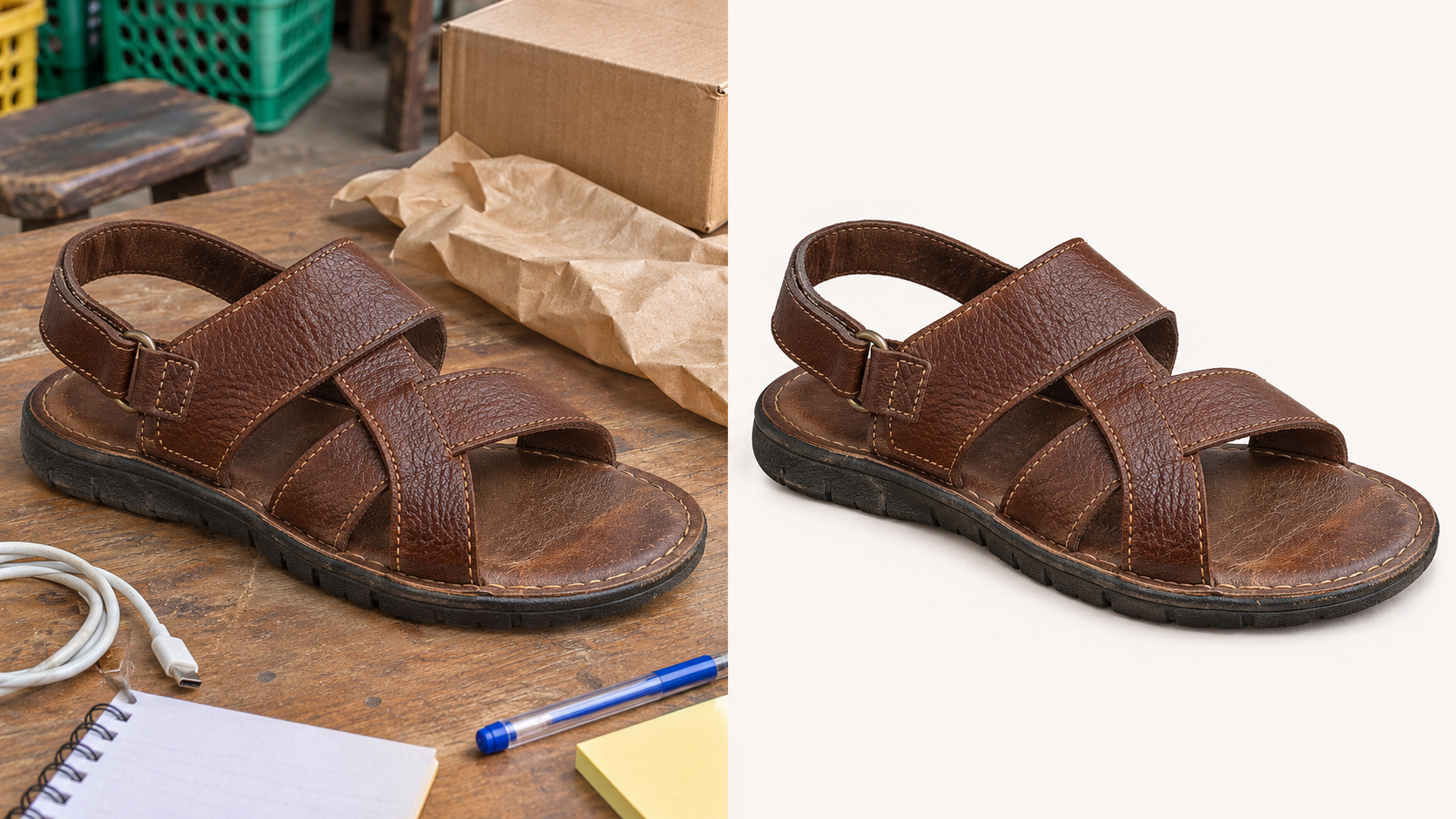
Conceptual illustration: background cleanup should preserve the product’s shape, colour, texture and visible condition. No readable text or branding.
3. Build a fact sheet before generating copy
Prepare a spreadsheet with your internal reference, product type, confirmed model or style, colour, material, measurements, variant options, condition, available quantity, selling price and included items. Add a private evidence column stating where each important fact came from.
Separate visible observations from verified specifications. A photograph might show a shoe’s colour, but it cannot reliably establish the material composition. A laptop casing cannot establish installed memory, storage capacity, battery condition or warranty coverage. A size label also does not replace measurements when fit information matters.
Leave uncertain values unresolved in your working sheet and investigate them. Avoid asking AI to complete every blank: a complete-looking table can be less useful than an honest list of missing information. Keep prices and stock tied to your current business records.
4. Generate titles and descriptions from approved facts
Use an AI writing tool whose access and data handling you have checked. Supply the fact sheet alongside the image if image input is supported. Ask for separate outputs: a product title, a short description, factual bullets and suggested image alt text.
An example instruction is: “Use only the approved facts below. Draft a clear product title, two short descriptive sentences and factual bullet points. List unanswered questions separately. Do not infer materials, authenticity, compatibility, warranty, condition, stock or price from the image.”
For a hypothetical garment, “Navy midi dress with short sleeves” is more defensible than adding “premium silk” without evidence. Add a verified brand or style identifier where it helps distinguish the item. Avoid praise that contributes no purchase information.
Shopify’s description guidance reinforces this review requirement: automatically generated content can introduce unsupported benefits or facts, and merchants remain responsible for what they publish. AI drafting is therefore a preparation step with an approval decision attached.
5. Prepare useful search descriptions
Write descriptions around how someone identifies the product: its type, distinguishing model or style, verified dimensions and intended use where established. Remove repeated keywords and claims such as “best in Nigeria” that your evidence does not support.
Keep image alt text focused on what the photograph shows. Put delivery coverage and store policies in the appropriate purchase information rather than forcing them into every image description. If the platform has separate search-preview fields, confirm how they work before assuming ordinary product copy populates them.
Professional presentation means consistent and accurate information. It does not establish search rankings, traffic or sales. No measured topic-specific demand or performance evidence accompanies this assignment, so this workflow makes no such promises.
6. Map approved data into the catalog
Before a Baci bulk import, obtain the current supported CSV format and confirm access for your account. Map your working sheet to those accepted fields. Do not assume that image filenames, variant relationships or arbitrary spreadsheet columns will transfer automatically.
Use a small pilot containing a simple product, a product with variants and an item requiring detailed condition information. Where an import preview or unpublished state is available in the verified workflow, use it. Otherwise, agree on a controlled test method before introducing customer-visible changes.
Check that the correct image belongs to each product, variants have the right prices and quantities, and descriptions retain their intended formatting. Keep your source spreadsheet and original photographs as independent records; this recommendation does not establish general catalog-export availability in Baci.
7. Approve the listing as a buyer would read it
Open the resulting page on a phone. Check whether the first image clearly identifies the item, variant choices are understandable, and the description answers the questions you would ask before paying. Compare every price and quantity with your approved sheet.
For electronics, inspect condition, included accessories, compatibility evidence and the exact warranty you offer. For fashion, inspect size information, measurements and colour naming. Add return or exchange terms that your business can honour; do not let AI invent a policy.
Record who approved each pilot listing and which corrections were necessary. If you work alone, a second review against the physical item still serves a different purpose from approving the writing immediately after generating it.

Conceptual illustration: verify physical product details before approving generated listing copy. No readable labels, logos or interface elements.
Pricing and cost model
The Baci pricing page, checked on 4 November 2026, lists Free at ₦0 with a maximum of 10 products, Pro at ₦5,000 per month with unlimited products, and Premium at ₦15,000 per month. It does not establish a specific photo-processing allowance or the exact bulk-import entitlement mapping. Confirm those before budgeting.
Shopify’s pricing page displayed Basic at US$39 per month on monthly billing, or US$29 per month with yearly billing, when checked on the same date. These are the displayed USD terms, not a verified Nigerian checkout quote. They are not directly comparable total operating costs, and this guide does not convert them to naira.
Budget for the whole process: subscription, any separately required editing tool, data access, photography, review time and corrections. Ask whether AI usage has credits, limits or extra charges. Do not infer that unlimited products means unlimited AI generation.
For your pilot, record preparation time and corrections per approved product. Compare that with preparing the same kind of item manually. Your own result is a better purchasing basis than an unsupported promise that hundreds of photos will become finished listings instantly.
Checkout and payments
Baci implements merchant-configured options including Paystack, Korapay, Credit Direct and pay on delivery. Country, currency, eligibility and provider configuration apply. Shipping zones, rates, pickup and supported shipment workflows also require configuration and coverage checks. These are implementation and documentation findings, not evidence of a completed payment or delivery for your business.
Before sending customers to the catalog, verify the enabled payment method, the price attached to each variant, the delivery charge for an address you actually serve and the resulting order record. Use an agreed test process and inspect the outcome. Do not promise settlement timing or carrier performance without separate evidence.
This is where catalog accuracy becomes an operational issue for a Nigerian merchant: an appealing photograph does not resolve a wrong size, an incorrect naira price or an unsupported delivery address. Evaluate the listing and the purchase workflow together.
Best fit
This approach suits a solo merchant who can identify products and verify their facts but needs a repeatable method for preparing images and copy. It is especially useful as a selection process: the pilot shows which assistance is worth paying for and where manual work remains necessary.
If your immediate requirement is unattended conversion of an entire camera roll into live Baci products, ask for an end-to-end demonstration first. Specify background cleanup, title generation, specification handling, variant creation, pricing and approval as separate acceptance criteria.
Baci’s mission is to make practical digital commerce infrastructure more accessible to African merchants, starting with Nigeria. Connecting catalog preparation with stock, payments and fulfillment gives that ambition a concrete operational purpose. The mission remains distinct from universal availability, a promised roadmap or measured merchant impact.
Verdict
Use AI to prepare catalog material, and retain a clear merchant approval step. Baci merits a small, verified pilot for its implemented catalog and broader commerce workflows. Shopify’s documented background editing provides a concrete comparison point, while its desktop requirement for description generation shows why device-level checks matter. Neither benchmark proves Baci’s complete photo-to-listing automation or removes the need to verify specifications and prices.
FAQ
Can Baci automatically turn phone photos into complete product listings?
The reviewed evidence establishes AI-assisted content and catalog workflows, but not a complete deployed photo-to-listing process. Confirm background cleanup, image input, specification handling, approval controls and account access through a demonstration before relying on it.
Can AI identify product specifications from a photograph?
Treat extracted details as suggestions until verified. Use labels, supplier records, measurements or device checks for specifications. Photographs alone should not establish material composition, internal hardware, authenticity, warranty or available stock.
Can I prepare the entire catalog on my phone?
Check each tool separately. Baci’s exact photo-to-catalog workflow needs verification. Shopify documents background editing on mobile, but its reviewed description-generation help page requires desktop access. Taking photographs on a phone does not establish that every subsequent step works there.
What should I verify before importing hundreds of products?
Confirm the supported CSV format, account entitlement, image handling, variant mapping, prices and stock. Test a small representative batch, review the resulting pages on a phone, and verify checkout and delivery settings before scaling.